





 김 동민
김 동민이 글에서는 Node.js 관리 할 일 앱 만들기 (Express + EJS) 과정을 단계별로 설명합니다.
Node.js 할 일 관리 기능 구현
H2: Node.js 관리 할 일 앱 기능 구현
H3: Express와 EJS로 Node.js 관리 앱 만들기
Node.js 할 일 관리 기능 구현은 단순히 할 일을 추가하고 삭제하는 수준을 넘어, 상태 관리와 데이터 저장까지 포함하는 개념입니다. 사용자는 할 일을 추가, 진행중, 완료, 취소 등 다양한 상태로 변경할 수 있으며, 이러한 정보는 JSON 파일에 즉시 반영되어 지속적으로 관리됩니다. Express 라우터와 EJS 템플릿을 활용하면 웹 브라우저에서 직관적으로 목록을 확인하고 조작할 수 있어, 개인 생산성을 높이는 실용적인 프로젝트로 발전시킬 수 있습니다.
Express 프레임워크를 사용하면 라우팅을 손쉽게 구성할 수 있습니다. 예를 들어 /todos/add 경로에서는 새로운 할 일을 추가하고, /todos/delete/:index 경로에서는 특정 인덱스의 할 일을 삭제할 수 있습니다. 이런 RESTful 라우트 설계는 유지보수와 확장성에 유리합니다.
1. 프로젝트 소개
-
업무를 하다 보면 간단한 할 일 관리와 업무 지식 메모가 필요할 때가 많습니다. 이번에는 Node.js와 Express를 이용해 작은 웹앱을 만들고, JSON 파일을 이용해 데이터를 서버 재시작 후에도 유지할 수 있도록 구현했습니다.
2. 프로젝트 구성 설명
-
-
Todos: 할 일을 추가, 진행중, 완료, 취소, 삭제할 수 있음
-
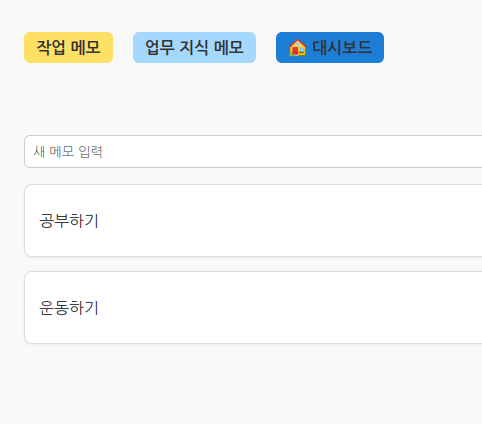
Notes: 업무 지식 메모를 추가/삭제할 수 있음
-
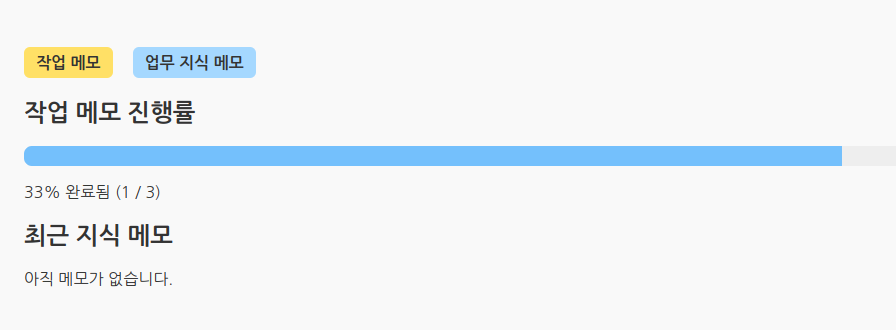
Dashboard: 전체 진행률과 최근 메모를 한눈에 확인
-
- 파일 구조 상태
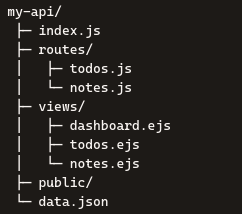
3. 구현 과정
OS : Rocky Linux 10.1
node 최신 버전으로 활성화 및 업그레이드
sudo dnf module enable nodejs:18 -y

sudo dnf install nodejs -y
업그레이드 확인
node -v
v22.22.2

npm -v
10.9.7
api 설치할 디렉토리 생성
mkdir my-api
cd my-api
라이브러리 설치
npm install ejs
npm install express
핵심 디렉토리 생성
mkdir -p /root/my-api/public

mkdir -p /root/my-api/routes

mkdir -p /root/my-api/views
데이터 보존 파일 생성
touch /root/my-api/data.json
echo '{ "todos": [], "notes": [] }' > /root/my-api/data.json
vi /root/my-api/index.js ( API 서버의 메인 실행 파일)
const express = require('express');
const path = require('path');
const bodyParser = require('body-parser');
const fs = require('fs');
const dataPath = path.join(__dirname, 'data.json');
const app = express();

// 데이터 로드
let { todos, notes } = JSON.parse(fs.readFileSync(dataPath, 'utf8'));

// 뷰 엔진 설정
app.set('views', path.join(__dirname, 'views'));
app.set('view engine', 'ejs');

// 미들웨어
app.use(bodyParser.urlencoded({ extended: false }));
app.use(express.static('public'));

// 라우터 연결
const todosRouter = require('./routes/todos')(todos);
app.use('/todos', todosRouter);

const notesRouter = require('./routes/notes')(todos, notes);
app.use('/notes', notesRouter);


// 대시보드 라우트
app.get('/', (req, res) => {
const total = todos.length;
const completed = todos.filter(t => t.status === 'complete').length;
const percent = total > 0 ? Math.round((completed / total) * 100) : 0;
res.render('dashboard', { todos, notes, total, completed, percent });
});

// 서버 종료 시 데이터 저장
process.on('SIGINT', () => {
fs.writeFileSync(dataPath, JSON.stringify({ todos, notes }, null, 2));
console.log('데이터 저장 완료!');
process.exit();
});

// 서버 실행
app.listen(3000, () => {
console.log('API 서버가 3000번 포트에서 실행 중...');
});
vi /root/my-api/views/dashboard.ejs ( 대시보드 화면 구성 파일 )
<!DOCTYPE html>
<html lang="ko">
<head>
<meta charset="UTF-8">
<title>대시보드</title>
<link rel="stylesheet" href="/styles.css">
</head>
<body>
<h1>대시보드</h1>

<!-- 네비게이션 -->
<nav class="navbar">
<a href="/todos">작업 메모</a>
<a href="/notes">업무 지식 메모</a>
</nav>

<!-- 진행률 표시 -->
<section>
<h2>작업 메모 진행률</h2>
<%
const total = todos.length;
const completed = todos.filter(t => t.status === 'complete').length;
const percent = total > 0 ? Math.round((completed / total) * 100) : 0;
%>
<div class="progress-bar">
<div class="progress" style="width:<%= percent %>%"></div>
</div>
<p><%= percent %>% 완료됨 (<%= completed %> / <%= total %>)</p>
</section>

<!-- 최근 지식 메모 -->
<section>
<h2>최근 지식 메모</h2>
<% if (notes.length === 0) { %>
<p>아직 메모가 없습니다.</p>
<% } else { %>
<ul>
<% notes.slice(-5).reverse().forEach(n => { %>
<li><%= n.text %></li>
<% }) %>
</ul>
<% } %>
</section>
</body>
</html>
vi /root/my-api/views/layout.ejs (메인 화면 레이아웃 설정 파일)
<nav class="navbar">
<a href="/todos">작업 메모</a>
<a href="/notes">업무 지식 메모</a>
</nav>
vi /root/my-api/public/styles.css (사이트 스타일 파일)
/* 기본 레이아웃 */
body {
  font-family: 'Segoe UI', sans-serif;
  margin: 40px;
  background-color: #f9f9f9;
  color: #333;
}

/* 제목 */
h1 {
  font-size: 28px;
  font-weight: 700;
  margin-bottom: 20px;
  text-align: center;
}

/* 폼 영역 */
form {
  margin: 10px 0;
  display: flex;
  gap: 8px;
}

input {
  flex: 1;
  padding: 8px;
  border: 1px solid #ccc;
  border-radius: 6px;
}


button {
  padding: 8px 14px;
  border: none;
  border-radius: 6px;
  cursor: pointer;
  font-weight: 500;
  background-color: #eee;
  transition: background-color 0.2s ease;
}

button:hover {
  background-color: #ddd;
}

/* 메시지 박스 */
.message {
  margin: 15px 0;
  padding: 10px;
  background-color: #e7f5ff;
  border: 1px solid #74c0fc;
  border-radius: 6px;
  text-align: center;
}

/* 할 일 목록 */
ul {
  list-style-type: none;
  padding: 0;
}

li {
  display: flex;
  align-items: center;
  justify-content: space-between;
  background-color: #fff;
  border: 1px solid #ddd;
  border-radius: 8px;
  padding: 10px 14px;
  margin-bottom: 14px;
  box-shadow: 0 1px 3px rgba(0,0,0,0.05);
}


/* 할 일 텍스트 */
.task {
  flex-grow: 1;
  font-weight: 500;
}

/* 버튼 그룹 */
li form {
  display: inline;
  margin-left: 6px;
}

/* 상태별 색상 */
button:contains("진행중") { background-color: #ffe08a; }
button:contains("완료") { background-color: #b2f2bb; }
button:contains("취소") { background-color: #ffd6a5; }
button:contains("삭제") { background-color: #ffadad; }

/* 완료된 항목 강조 */
li.complete {
  background-color: #e6ffed;
  border-color: #b2f2bb;
}

/* 아이콘 색상 */
li.complete .task::before {
  content: "✅ ";
  color: #2b8a3e;
}

li.inprogress .task::before {
  content: "⏳ ";
  color: #f59f00;
}

.navbar {
  display: flex;
  gap: 20px;
  margin-bottom: 20px;
}

.navbar a {
  text-decoration: none;
  font-weight: 600;
  color: #333;
}

.navbar a:hover {
  color: #1c7ed6;
}


.progress-bar {
  width: 100%;
  background-color: #eee;
  border-radius: 8px;
  overflow: hidden;
  margin: 10px 0;
}

.progress {
  height: 20px;
  background-color: #74c0fc;
}

.navbar a {
  text-decoration: none;
  font-weight: 600;
  color: #333;
  padding: 6px 12px;
  border-radius: 6px;
}

.navbar a:hover {
  background-color: #f1f3f5;
  color: #1c7ed6;
}

.dashboard-btn {
  margin-right: auto; /* 오른쪽 끝으로 밀기 */
  background-color: #1c7ed6;
  color: white;
  padding: 6px 12px;
  border-radius: 6px;
  text-decoration: none;
  font-weight: bold;
}

.dashboard-btn:hover {
  background-color: #1971c2;
}

/* 작업 메모 버튼 */
.navbar a[href="/todos"] {
  background-color: #ffe066;
  color: #333;
}

/* 업무 지식 메모 버튼 */
.navbar a[href="/notes"] {
  background-color: #a5d8ff;
  color: #333;
vi /root/my-api/routes/notes.js (메모 추가 파일)
const express = require('express');
const router = express.Router();
const fs = require('fs');
const path = require('path');
const dataPath = path.join(__dirname, '../data.json');

module.exports = (todos, notes) => {

// 데이터 저장 함수
function saveData() {
fs.writeFileSync(dataPath, JSON.stringify({ todos, notes }, null, 2));
}

// 📋 메모 목록
router.get('/', (req, res) => {
const message = req.query.message || '';
res.render('notes', { notes, message });
});

// ➕ 메모 추가
router.post('/add', (req, res) => {
const text = req.body.text.trim();
const exists = notes.some(note => note.text === text);

if (!exists && text) {
const newNote = { id: Date.now(), text };
notes.push(newNote);
saveData(); // 즉시 저장
res.redirect('/notes?message=추가되었습니다');
} else {
res.redirect('/notes?message=이미 같은 메모가 있습니다');
}
});


// ❌ 메모 삭제
router.post('/delete/:index', (req, res) => {
notes.splice(req.params.index, 1);
saveData(); // 즉시 저장
res.redirect('/notes');
});

return router;
};
vi /root/my-api/routes/todos.js (작업 메모 파일)
const express = require('express');
const router = express.Router();
const fs = require('fs');
const path = require('path');
const dataPath = path.join(__dirname, '../data.json');

module.exports = (todos, notes) => {

// 데이터 저장 함수
function saveData() {
fs.writeFileSync(dataPath, JSON.stringify({ todos, notes }, null, 2));
}

// 📋 목록 조회
router.get('/', (req, res) => {
res.set('Cache-Control', 'no-store');
const message = req.query.message || '';

const sortedTodos = [...todos].sort((a, b) => {
if (a.status === 'complete' && b.status !== 'complete') return 1;
if (a.status !== 'complete' && b.status === 'complete') return -1;
return 0;
});

res.render('todos', { todos: sortedTodos, message });
});

// ➕ 추가
router.post('/add', (req, res) => {
const text = req.body.text.trim();
const exists = todos.some(todo => todo.text === text);

if (!exists && text) {
const newTodo = { id: Date.now(), text, status: 'pending' };
todos.push(newTodo);
saveData();
res.redirect('/todos?message=추가되었습니다');
} else {
res.redirect('/todos?message=이미 같은 할 일이 있습니다');
}
});

// ⏳ 진행중
router.post('/:id/inprogress', (req, res) => {
const id = parseInt(req.params.id);
const todo = todos.find(t => t.id === id);
if (todo) todo.status = 'inprogress';
saveData();
res.redirect('/todos?message=진행중으로 변경되었습니다.');
});


// ✅ 완료
router.post('/:id/complete', (req, res) => {
const id = parseInt(req.params.id);
const todo = todos.find(t => t.id === id);
if (todo) todo.status = 'complete';
saveData();
res.redirect('/todos?message=완료되었습니다.');
});

// ❌ 삭제
router.post('/delete/:index', (req, res) => {
todos.splice(req.params.index, 1);
saveData();
res.redirect('/todos');
});

// ↩️ 취소
router.post('/:id/cancel', (req, res) => {
const id = parseInt(req.params.id);
const todo = todos.find(t => t.id === id);
if (todo) todo.status = 'todo';
saveData();
res.redirect('/todos?message=취소되어 다시 할 일로 변경되었습니다.');
});

// 🔍 검색
router.get('/search', (req, res) => {
const q = req.query.q?.trim();
if (!q) return res.redirect('/todos?message=검색어를 입력하세요.');
const regex = new RegExp(`(${q})`, 'gi');
const filtered = todos
.filter(t => t.text.toLowerCase().includes(q.toLowerCase()))
.map(t => ({
...t,
highlighted: t.text.replace(regex, '<mark>$1</mark>')
}));
res.render('todos', { todos: filtered, message: `"${q}" 검색 결과입니다.` });
});

return router;
};
vi /root/my-api/views/todos.ejs (작업 메모 폼 설정 파일)
<!DOCTYPE html>
<html lang="ko">
<head>
<meta charset="UTF-8">
<title>목록</title>
<link rel="stylesheet" href="/styles.css">
</head>
<body>
<nav class="navbar">
<a href="/todos">작업 메모</a>
<a href="/notes">업무 지식 메모</a>
<a href="/" class="dashboard-btn">🏠 대시보드</a>
</nav>

<h1>목록</h1>
<!-- 검색 폼 -->
<form action="/todos/search" method="get">
<input name="q" placeholder="검색어 입력" required />
<button type="submit">검색</button>
</form>

<!-- 추가 폼 -->
<form action="/todos/add" method="post" onsubmit="this.querySelector('button').disabled=true;">
<input name="text" placeholder="새 할 일 입력" required />
<button type="submit">추가</button>
</form>

<!-- 메시지 표시 -->
<% if (message) { %>
<div class="message"><%= message %></div>
<% } %>

<!-- 목록 표시 -->
<% if (todos.length === 0) { %>
<p>할 일이 없습니다. 새 할 일을 추가해보세요!</p>
<% } else { %>
<ul>
<% todos.forEach((t, index) => { %>
<li class="<%= t.status %>">

<!-- 할 일 제목 -->
<span class="task"><%- t.highlighted || t.text %></span>


<!-- 상태별 버튼 -->
<% if (t.status !== 'complete') { %>
<% if (t.status !== 'inprogress') { %>
<form class="inline-form" action="/todos/<%= t.id %>/inprogress" method="post">
<button type="submit">진행중</button>
</form>
<% } %>
<form class="inline-form" action="/todos/<%= t.id %>/complete" method="post">
<button type="submit">완료</button>
</form>
<% } else { %>
<form class="inline-form" action="/todos/<%= t.id %>/cancel" method="post">
<button type="submit">취소</button>
</form>
<% } %>

<!-- 삭제 버튼 -->
<form class="inline-form" action="/todos/delete/<%= index %>" method="post">
<button type="submit">삭제</button>
</form>
</li>
<% }) %>
</ul>
<% } %>
</body>
</html>
vi /root/my-api/views/notes.ejs (작업 메모 폼 설정 파일)
<!DOCTYPE html>
<html lang="ko">
<head>
<meta charset="UTF-8">
<title>업무 지식 메모</title>
<link rel="stylesheet" href="/styles.css">
</head>
<body>
<nav class="navbar">
<a href="/todos">작업 메모</a>
<a href="/notes">업무 지식 메모</a>
<a href="/" class="dashboard-btn">🏠 대시보드</a>
</nav>

<h1>업무 지식 메모</h1>

<!-- 추가 폼 -->
<form action="/notes/add" method="post">
<input name="text" placeholder="새 메모 입력" required />
<button type="submit">추가</button>
</form>

<!-- 메시지 표시 -->
<% if (message) { %>
<div class="message"><%= message %></div>
<% } %>

<!-- 목록 표시 -->
<% if (notes.length === 0) { %>
<p>메모가 없습니다. 새 메모를 추가해보세요!</p>
<% } else { %>
<ul>
<% notes.forEach((n, index) => { %>
<li>
<span class="task"><%= n.text %></span>
<form class="inline-form" action="/notes/delete/<%= index %>" method="post">
<button type="submit">삭제</button>
</form>
</li>
<% }) %>
</ul>
<% } %>
</body>
</html>
node 실행
node index.js
API 서버가 3000번 포트에서 실행 중...
[브라우져 접속]
http://서버 ip:3000
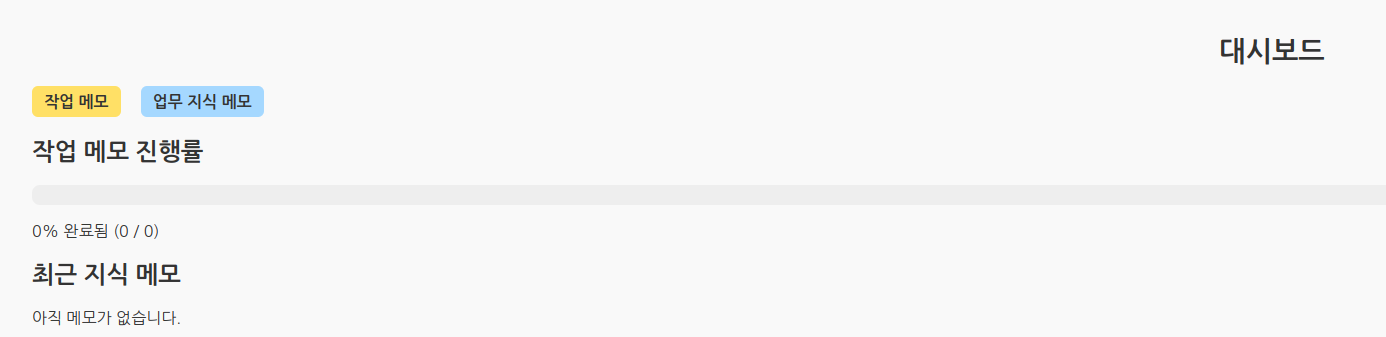
[기능 테스트]
작업 메모에서 목록을 추가 -> 진행중,완료 상태로 두었을때 완료상태가 된것은 맨 아래로 가게끔 설정
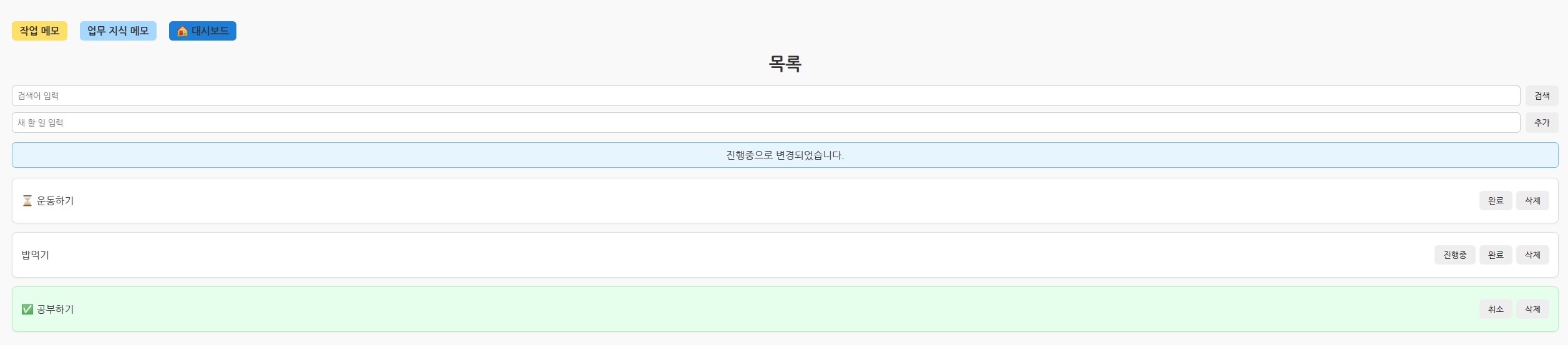
조회했을때 아래와 같이 나온 모습
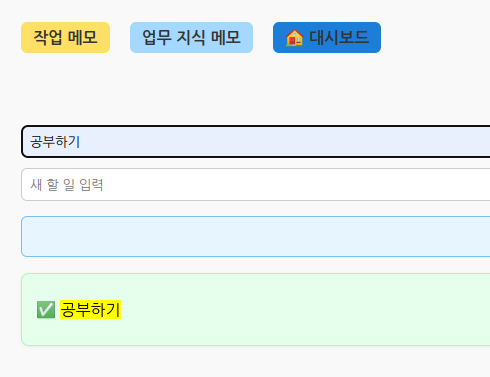
대시보드 화면에서는 완료된 항목에 대해서 진행도가 표시된 상태
업무 지식 메모에서 목록 추가하기
대시보드에 최근 지식 메모에 나온것을 확인
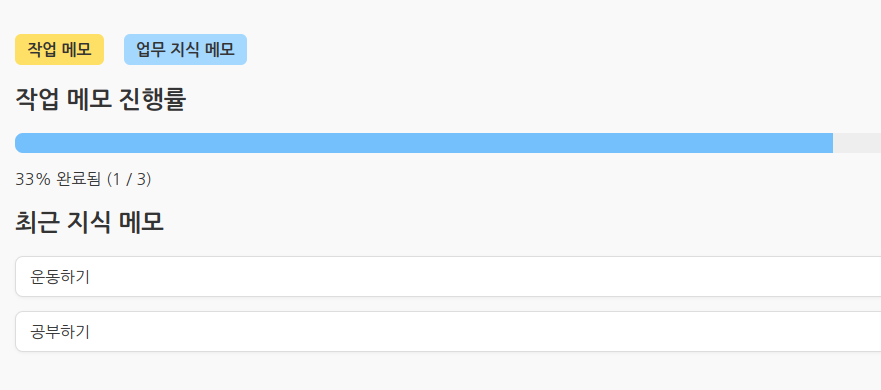
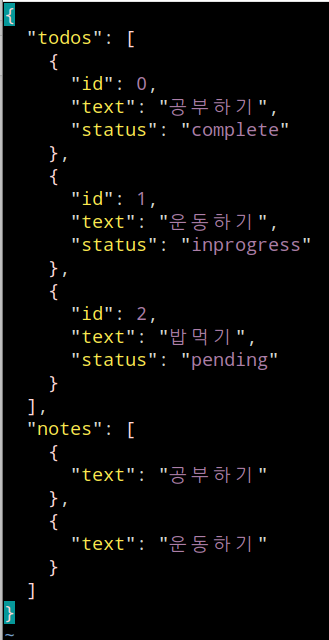
서버를 재부팅 해도 데이터가 남아있는것을 확인
vi /root/my-api/data.json
Node.js 할 일 관리 앱을 통해 생산성을 높일 수 있습니다.
http://pachyuchepe.tistory.com in Bing
“이 글에 전체적인 방향과 내용은 직접 책임지고 작성하였으며, AI는 코딩 구현과 일부 아이디어 제공에 활용되었습니다”